
Open Files Your Way
Use drag and drop, the file picker, File Explorer, or a command-line path. Open several files in separate windows.
Open AI-generated CSV files in a readable, read-only table without resizing columns, wrapping text, or cleaning up formatting every time.
Free for Windows 10 and 11 · No admin rights · No .NET install
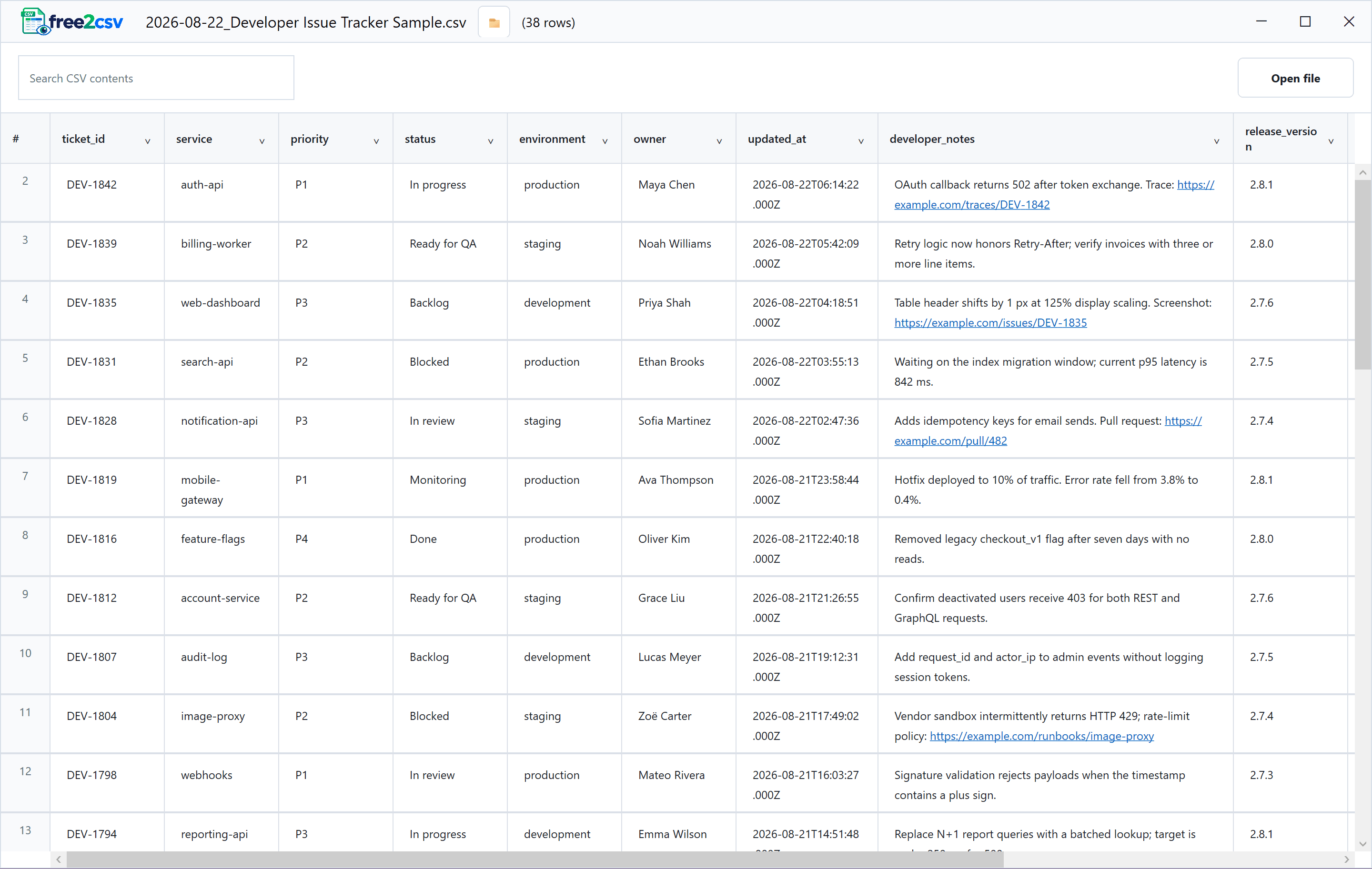
AI tools, agents, and scripts create CSV files quickly. free2csv opens them with wrapped cells, practical column widths, frozen headers, and review controls already in place.
Drag in a CSV, find any value, sort or filter columns, copy what you need, and reveal the source in File Explorer. free2csv keeps the original file unchanged.
View all featuresUse drag and drop, the file picker, File Explorer, or a command-line path. Open several files in separate windows.
Wrapped cells, flexible row heights, a frozen header, and practical column widths make long CSV content easier to scan.
Search every visible value, sort one column, and combine filters across columns without changing the file.
Select Show in folder to open File Explorer with the current CSV highlighted.
Copy a full cell with one click, or copy only the text you selected.
free2csv has no edit or save controls. Viewing, sorting, filtering, and finding do not rewrite the source.
Install free2csv from Microsoft Store, or tell me what would make it more useful.